- Author
- WhiteBIT

- Date
- Views
- 0
- Reading time
- 10 min.
Blockchain Transaction Statuses: What They Mean and How to Check Them

Key Takeaways:
- Transaction status shows what stage a transaction is at and whether it has been successfully processed by the network.
- The main statuses are Pending, Success/Confirmed, Failed/Reverted, and Dropped/Replaced.
- Confirmations appear after a transaction is included in a block and subsequent blocks are added to the chain.
- TxID and a blockchain explorer allow you to check the transaction status, fee, addresses, confirmations, and other transaction data.
- A stuck transaction can be accelerated or replaced on some networks, while the Failed or Success status helps determine where to look for the cause of the problem.
What Is a Transaction Status on the Blockchain?
A transaction status on the blockchain is the current state of an operation that shows whether the transaction has been accepted by the network, processed and confirmed, or ended with an error.
How to Check a Bitcoin Transaction Status?
You can check the status of a Bitcoin transaction using a blockchain explorer — a service for viewing data from a specific network.
To check it, you will need the transaction hash (TxID) — a unique identifier that can usually be found in the transaction history of a wallet or crypto exchange. Copy the TxID and paste it into the search bar of the explorer for the relevant network.
For example, Ethereum. You can view the transaction status using Etherscan. You can check the transaction status of Bitcoin on mempool.space, while Whitechain Explorer is suitable for WBT.
 Source: https://explorer.whitechain.io/
Main Blockchain Transaction Statuses
The names and logic of statuses may vary slightly depending on the blockchain, wallet, or explorer. However, users most commonly encounter four main states: Pending, Success, Failed, and Dropped/Replaced.
Pending
Pending means that the transaction has been sent to the network but has not yet received the required confirmation. Simply put, the operation is waiting to be processed and is not yet considered complete.
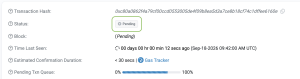
Source: https://etherscan.io/
A transaction may remain Pending due to high network congestion or a fee that is too low. On some networks, such a transaction can be accelerated by replacing it with a new version with a higher fee.
Confirmed/Success
Confirmed or Success means that the transaction has been successfully processed by the network and included in a block.

Source: https://etherscan.io/
However, the first confirmation does not always mean that the transaction is final. Depending on the blockchain or service, a certain number of confirmations or finality may be required before the transfer is considered fully complete.
Fail/Reverted
Fail or Reverted means that the transaction could not be completed successfully.

Source: https://etherscan.io/
The reason may be a smart contract error, an insufficient gas limit, or a change in the transaction conditions before it was executed. On EVM networks, the fee for a Failed/Reverted transaction is usually still charged because the network has already spent computational resources processing it. At the same time, the changes that the operation itself was supposed to make are reverted.
Dropped/Replaced
Dropped means that an unconfirmed transaction has been removed from the processing queue. For example, this may happen if the fee was too low and network nodes stopped keeping the transaction in the mempool.
Replaced means that the original transaction has been replaced by another one. For example, on Ethereum and other EVM networks, a user can send a new transaction with the same nonce and a higher fee to replace the pending transaction.
What Are Transaction Confirmations?
A confirmation means that a transaction has been included in a block. Transactions are verified and included in a block by miners or validators, depending on the consensus mechanism of the specific blockchain. The first confirmation appears when the block containing the transaction is added to the chain, and each subsequent block increases the number of confirmations.
Imagine a train: a block is a carriage, while the blockchain is the entire train. Your transaction is located in one of the carriages. As new block-carriages are added, it moves deeper into the chain, making that part of the history increasingly difficult to change.
How Many Confirmations Are Needed?
There is no single number of confirmations for all blockchains. It depends on the network architecture, the value of the transaction, and the requirements of the specific service.
For example, in Bitcoin, the first confirmation appears after a transaction is included in a block, while 6 confirmations are often used as a reference point for large transfers. In Ethereum, instead of a fixed universal number, finality — the state in which a block is considered finalized by the protocol — is playing an increasingly important role.
When depositing funds to an exchange or another service, it is better to follow its requirements: the platform itself determines how many confirmations are required before the funds are credited.
What to Do If a Transaction Is Stuck?
If a transaction remains Pending for a long time, you can take the following steps:
- Wait. When network congestion is high, transaction processing may take longer. If the fee is sufficient, the transaction may be confirmed without any additional action.
- Speed up the transaction. Some wallets allow you to increase the fee for a transaction that has already been sent. For example, MetaMask has a Speed Up feature for this purpose: the wallet resends the transaction with the same nonce but with a higher gas fee.
- Create a replacement transaction manually. If there is no automatic acceleration feature, on EVM networks you can resend the transaction with the same nonce — the sequential number of a transaction from a specific address — and specify a higher fee. Once the new version is confirmed, the old one can no longer be executed separately.
- Cancel the transaction. If the transaction is no longer needed, it can be replaced by another transaction with the same nonce and a higher fee. For example, MetaMask does this using the Cancel feature.
- Do not resend the transfer as a new transaction. If you simply create another transfer with a different nonce, it will not replace the stuck transaction. As a result, both transactions may be confirmed, and the funds may be sent twice.
What to Do If a Transaction Fails?
If a transaction receives the Failed status, it cannot be executed again. You should:
- Check the reason for the error in the blockchain explorer — for example, insufficient gas or an error during smart contract execution.
- Resolve the cause and only then send a new transaction.
- Consider the fee: on EVM networks, gas for a failed transaction is usually not refunded because the network has already spent resources executing it.
What to Do If a Transaction Is Successful but the Funds Have Not Arrived?
The Success status means that the transaction was successfully executed on the blockchain. If the funds are still not displayed, you should:
- Check the recipient address and network using a blockchain explorer.
- Check whether the token is displayed: sometimes it needs to be added to the wallet manually.
- Wait for the service to credit the funds. An exchange or another service may wait for additional confirmations.
- Contact support, providing the TxID, if everything is correct on the blockchain but the funds still have not appeared.
Conclusion
Understanding transaction statuses helps you determine more quickly what is happening with a transfer and whether any action is required. Even if a transaction is delayed or fails, its status and blockchain data help you understand the situation calmly without unnecessary panic.
This material is for informational purposes only and does not constitute financial or investment advice.
Share to
Published by
WhiteBIT